
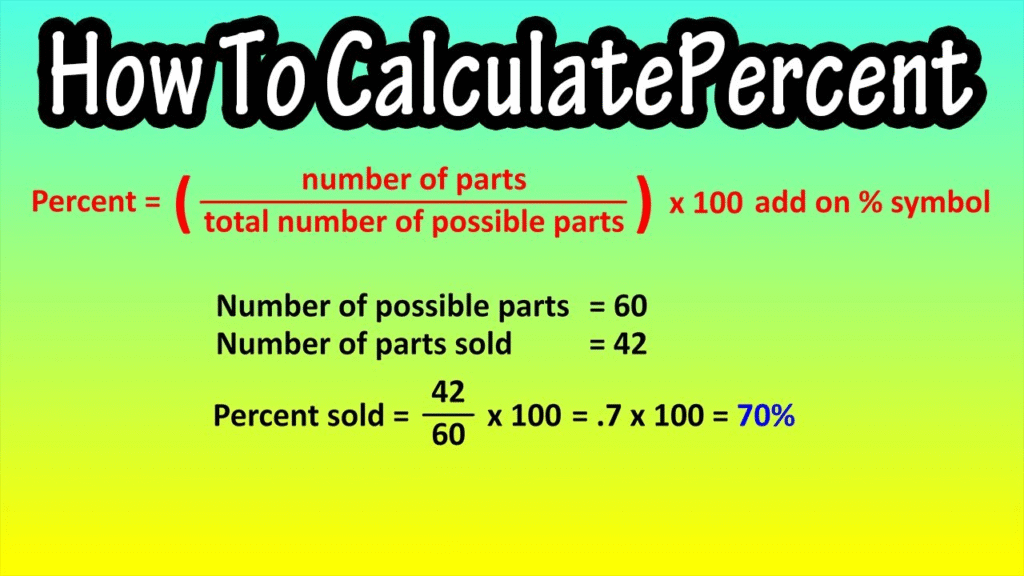
Understanding how to calculate grade percentage is essential for students who want to track their academic progress accurately. Whether you are preparing for school exams, college assessments, or competitive tests, knowing your exact percentage helps you plan better. Instead of doing long manual calculations, students now prefer using smart tools like this online grade calculator, which gives instant and error-free results.
This complete guide will walk you through formulas, real-life examples, common mistakes, GPA conversion, and quick methods to calculate your grade percentage with confidence.
What Is a Grade Percentage?
Grade percentage is the ratio of marks you obtained compared to the total marks, expressed out of 100. It shows your overall performance in a clear numerical format that is universally understood.
It is widely used in:
- Schools and colleges
- Scholarship eligibility
- Job applications
- Academic progress tracking
Unlike grades or GPA, a percentage gives a direct performance score. Using a marks percentage calculator can simplify this process for multiple subjects.
Why Knowing Your Grade Percentage Is Important
Students often underestimate the value of percentages, but they play a vital role in academic and professional life.
Knowing your grade percentage helps you:
- Check eligibility for colleges and universities
- Apply for scholarships and merit-based programs
- Identify weak academic areas
- Compare performance over time
- Build confidence through clear progress tracking
Many institutions rely solely on percentage for admission shortlisting. Using a grade calculator ensures you always have accurate results.
Basic Formula to Calculate Grade Percentage
The standard formula used worldwide is:
Grade Percentage = (Obtained Marks ÷ Total Marks) × 100
This formula works for:
- One subject
- Multiple subjects
- Semester results
- Annual exams
- Competitive test scores
How to Calculate Grade Percentage Manually (With Example)
Manual calculation is easy if you follow the steps carefully.
Step 1: Add Obtained Marks
Add all the marks you scored in each subject.
Example:
English = 75
Math = 88
Science = 80
Total Obtained Marks = 243
Step 2: Add Total Marks
Each subject = 100 marks
Total Marks = 300
Step 3: Apply the Formula
(243 ÷ 300) × 100 = 81%
Your final grade percentage is 81%. For larger subjects or multiple semesters, a marks percentage calculator can save time.
How to Calculate Grade Percentage for College or University
For higher studies, the method remains the same but usually involves more subjects or credit systems.
Steps include:
- Add all obtained semester marks
- Add all the total semester marks
- Divide and multiply by 100
Many students use a college grade calculator to avoid confusion in multi-semester calculations and ensure accurate results.
How to Convert GPA into Percentage
Some institutions follow GPA instead of percentage. A commonly used conversion formula is:
Percentage = GPA × 9.5
Example:
GPA = 3.6
Percentage = 3.6 × 9.5 = 34.2%
Always confirm with your institution because GPA scales may differ. You can also use a GPA to percentage calculator for instant results.
Common Mistakes Students Make While Calculating Percentage
Even small errors can lead to wrong results. The most common mistakes include:
- Forgetting to multiply by 100
- Adding total marks incorrectly
- Using the wrong GPA conversion formula
- Mixing credit-based and subject-based marks
- Rounding off too early
Double-checking your totals before applying the formula is always recommended. For instant accuracy, a grade percentage calculator is highly useful.
Smart Tips to Improve Your Grade Percentage
Calculating a percentage tells you where you stand, but improving it is the real goal. These tips can help boost your score:
- Focus more on weak subjects
- Practice past papers regularly
- Improve time management during exams
- Avoid careless arithmetic mistakes
- Track results after every test
Even a small improvement in each subject can significantly raise your overall percentage. Use a marks calculator to track improvements instantly.
How Teachers and Institutes Use Grade Percentage
Grade percentage is not only important for students. Teachers use it to:
- Evaluate class performance
- Prepare academic reports
- Identify learning gaps
- Design improvement plans
- Compare performance year by year
Accurate percentage calculation ensures fair assessment for all students. Online grade calculators make this process faster and error-free.
Frequently Asked Questions (FAQs)
What is the easiest way to calculate grade percentage?
Use the formula (Obtained Marks ÷ Total Marks) × 100 or a grade calculator for instant results.
Can I calculate the grade percentage for one subject?
Yes, divide your obtained marks by the total marks of that subject and multiply by 100.
How do I calculate the Percentage from GPA?
Multiply your GPA by the standard conversion factor (usually 9.5), or use a GPA to percentage calculator.
Is grade percentage important for admission?
Yes, most schools, colleges, and universities use grade percentages for eligibility and merit lists.
Which tool is best for calculating grade percentage?
A reliable grade calculator tool gives quick and accurate results.
Conclusion: Calculate Accurately & Plan Your Academic Success
Now that you clearly understand how to calculate grade percentage, you can track your academic progress with confidence. Whether you calculate manually or use a smart digital tool, accuracy is what matters most.For fast and error-free results, try this online grade calculator. If this guide helped you, share it with classmates, leave a comment, and explore more tools to improve your academic performance.